Technical Notes · iOS App Development
Building Go-To List: an iOS App for Production Professionals
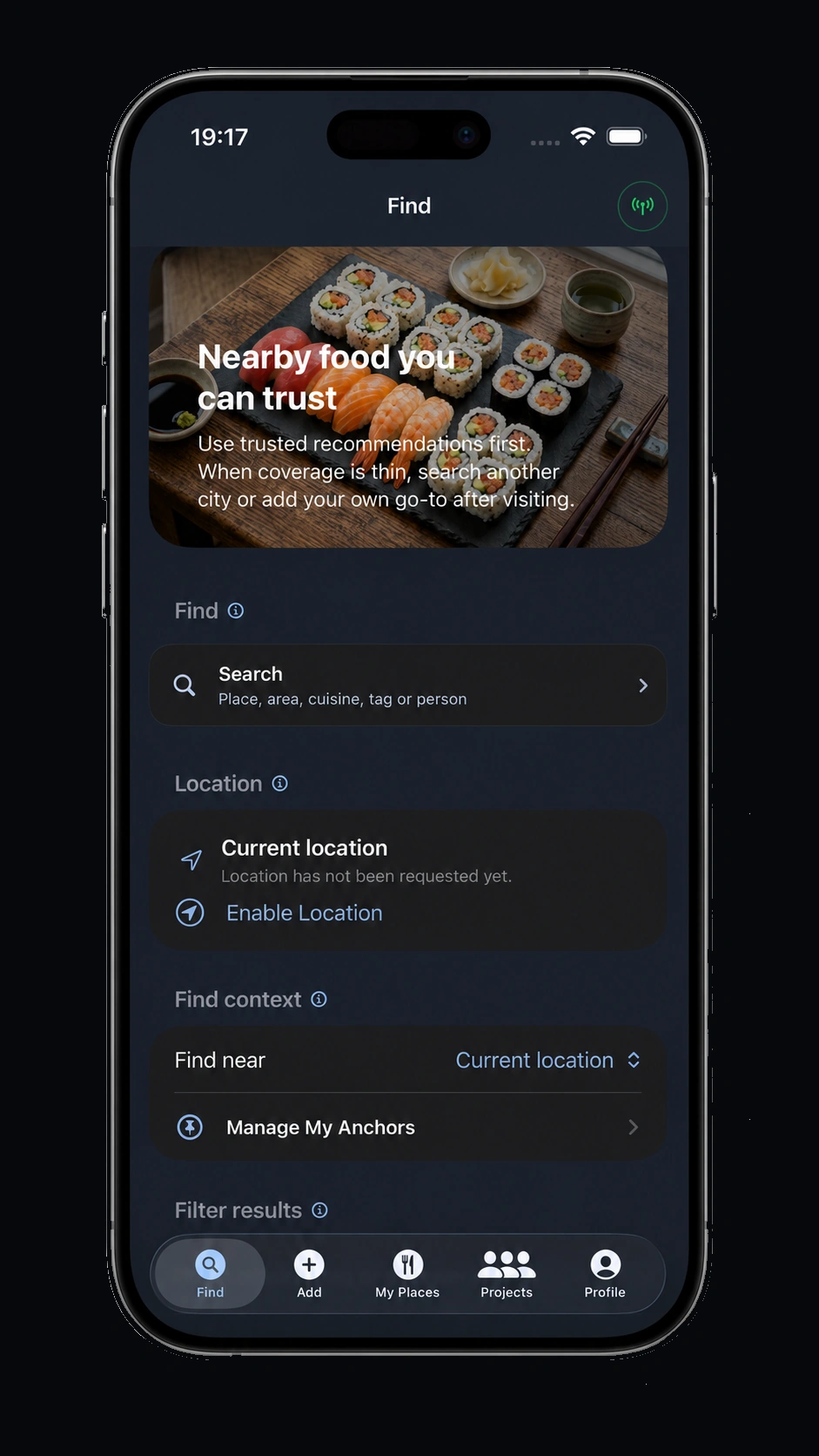
I have built a few small desktop utilities with help from current AI development tools, including some that are available from the Apps page of this site. Those projects were useful, contained and fairly forgiving. The next step was deliberately less forgiving: build a full iOS app, sign it properly, get it through App Store review and make it available as a real Apple-released app.
The result is Go-To List, a free iPhone app for collecting and finding trusted food recommendations. It is not a lighting-control app, and it is not trying to be a piece of console workflow. It sits beside the job rather than inside the rig. The intended audience, however, is very much our world: lighting programmers, lighting designers, camera, video, sound, rigging, stage management, production managers and crew who spend a lot of time away from home, in unfamiliar cities, on tour, in studios or between venues.
Most of us already keep informal lists of places that are reliable after a long day, close to a hotel, open late, good before a call time or safe when you are working somewhere unfamiliar. Go-To List turns that habit into a small, structured directory. It prioritises trusted recommendations first, lets you search by place, area, cuisine, tag or person, and allows users to add their own go-to places after visiting.
Download: Go-To List is available free from the App Store at apps.apple.com/app/go-to-list. The app website is gotolist.app.
Starting with a fixed scope
The biggest risk with this kind of project is not the first line of code. It is feature creep. App ideas can easily drift from one useful thing into a collection of half-finished ideas: accounts, feeds, ratings, maps, social features, admin tools, notifications, badges, recommendations, favourites and a dozen other “quick” additions that are never actually quick.
For this project the brief had to stay narrow. The problem was simple: when you are working away, find nearby food you can trust, preferably from people whose judgement is relevant to the way our industry works. That gave the app a clear centre of gravity. Every feature had to answer the same question: does this make it easier for a production professional to find, save or share a reliable place?
The development reality
The process was more time-consuming than I expected. Some of that is probably down to being too fussy, but a lot of it is simply the reality of moving from a desktop utility to a public iOS release. There are more moving parts, more edge cases and more formal requirements.
Before the final release I worked through more than 140 iterations, not counting the builds that were immediately rejected by me before they reached anyone else. Friends and colleagues helped test the app, which was essential. Real testers find things that the developer stops seeing: confusing labels, odd flows, assumptions about location permissions, search behaviour that makes sense in one city and not another, and small interface details that become annoying after repeated use.
From first serious build to Apple-approved release, the project took a little over two months. I would rate the technical difficulty at about 7/10 and the patience requirement at 12/10. The app is straightforward in concept, but App Store release work rewards methodical checking more than optimism.
What has to happen before App Store release
Publishing an iOS app is a formal pipeline rather than a single upload button. The exact details vary by project, but the main stages are consistent.
- Xcode project structure: the app needs correct bundle identifiers, signing settings, deployment targets, build numbers, icons, launch assets and a clean archive build.
- Apple Developer account: personal development and device testing can be done without paying for App Store distribution, but public release requires enrolment in the Apple Developer Program.
- App Store Connect: this is where the listing is built: app name, description, screenshots, support URL, marketing URL, age rating, category, privacy details and version information.
- Privacy manifest and declarations: the app must be clear about data use. If an app uses location, accounts, analytics, third-party SDKs or any privacy-relevant API, the declarations need to match what the app actually does.
- TestFlight: beta distribution is not just a nice extra. It is the most practical way to get the app onto other devices, collect feedback and catch issues before review.
- Submission and review: Apple review can be quick, but first releases should allow time for rejection, clarification or another build. Treat review feedback as part of the process rather than as an administrative afterthought.
Costs in GBP
You do not need to pay the Apple Developer Program fee to learn iOS development, build personal projects or run apps on your own device through Xcode. That is an important distinction. Experimenting, prototyping and learning Swift, SwiftUI or UIKit does not require committing to a public App Store release.
If you want to publish on the App Store, the standard Apple Developer Program membership in the UK is £79 per year. That is the gateway cost for public distribution, App Store Connect, TestFlight at proper scale and production signing.
There can also be supporting costs depending on the app: domain name, hosting, storage, database, mapping or location services, analytics, design assets, test devices and whatever backend infrastructure the product needs. A simple app can still have an operational footprint, so the real cost is not only the Apple membership. The biggest cost is usually time.
Where AI helped, and where it did not
AI tools were useful throughout the build, but not as a replacement for understanding the product. They helped with scaffolding, refactoring, debugging, explaining Xcode errors, generating test cases and sanity-checking technical approaches. That makes development faster, but it also makes it easier to produce mistakes quickly.
The judgement still has to come from the person building the app. You need to decide what the feature is meant to do, what should be removed, what should be tested again, and what is good enough to ship. AI can help write code, but it does not know whether an interface is irritating after three days of real use on a production schedule.
Lessons for production people building their own app
The main lesson is to define the scope before the exciting part starts. A small app with a clear purpose is much more likely to reach release than a large app with a vague ambition. Write down the core user problem, keep a feature list, and be willing to move ideas into a later version rather than forcing them into the first one.
Testing also needs to involve people outside your own head. In our industry, that is particularly important because production workflows are full of real-world constraints: bad signal, short breaks, odd travel days, unfamiliar cities, late finishes, multiple time zones and users who are not interested in working around your app’s assumptions. If it is meant for professionals, it has to behave sensibly under professional conditions.
Finally, keep the release process in mind from the beginning. Privacy, support links, screenshots, app naming, build numbers and TestFlight notes all feel secondary when you are trying to make the core feature work, but they become blockers near the end if ignored.
Why Go-To List fits here
This site is primarily about lighting programming, lighting design, broadcast control and production technology. Go-To List is not strictly lighting related, but it is designed for the same people I work with every week. It is a practical tool for industry professionals who move between studios, venues, rehearsal rooms, hotels and cities, and who often rely on recommendations from other crew rather than generic star ratings.
That makes it part of the wider production toolkit. Not every useful app needs to talk DMX, OSC, MIDI or timecode. Some tools simply remove friction from the working day. For a lot of us, knowing where to get decent food before or after a call is a small but very real part of surviving the schedule.
I have already started on a second, more generic app that is not specifically aimed at production or lighting. The lesson from Go-To List will carry straight into that build: keep the first version focused, test with real users, expect the final polish to take longer than the first prototype, and do not underestimate the patience required to get something through the App Store properly.